

If you know exactly where a document lived on the old server but can’t figure out where it ended up in NetDocuments, you can search for it by that folder path.
Why This Works
When we migrate your documents from Windows folders into NetDocuments, we put the full folder path each document came from into its Comments field. Something like:
\\server\share\Clients\Smith\Pleadings
That path stays on the document’s profile after the migration. So if you remember where a document used to live, NetDocuments can tell you where it lives now.
How to Search by the Old Folder Path
Step 1: Copy the Folder Path You Remember
Grab the path from wherever you have it — an old shortcut, an old email, your notes. If you only remember part of it, that’s fine. See Step 3.
Step 2: Open Advanced Search
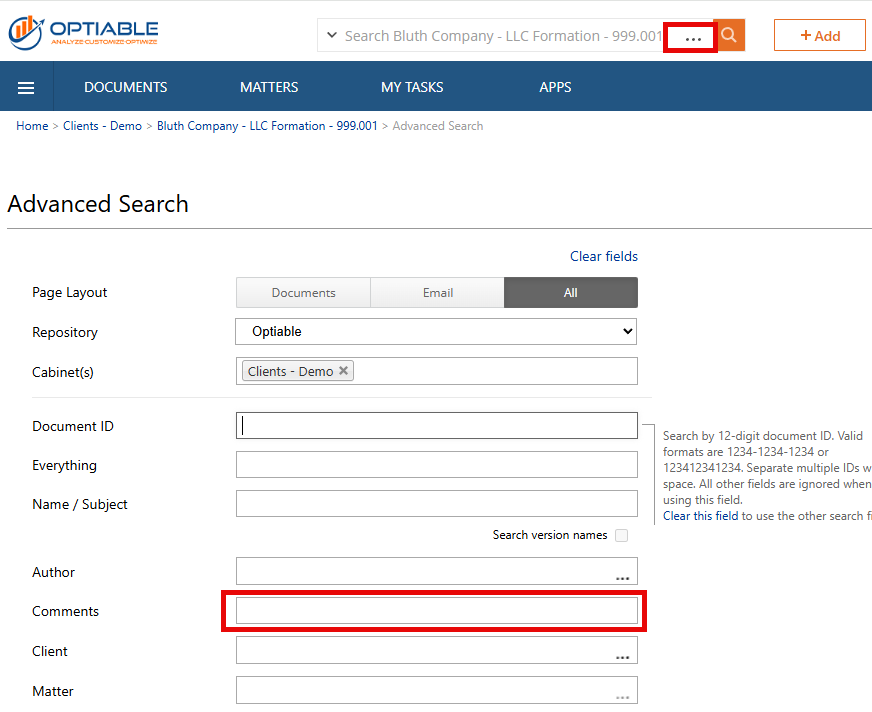
In NetDocuments, open Advanced Search.
Step 3: Paste the Path into the Comments Field
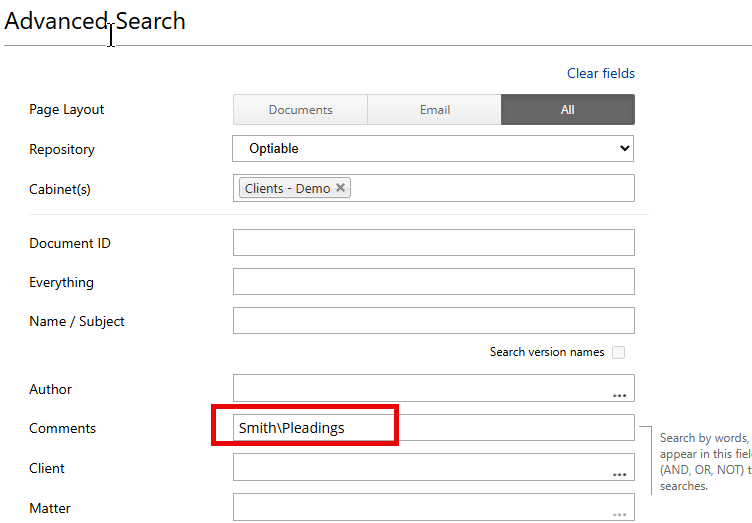
Paste the folder path into the Comments field.
You don’t need the whole path. A piece of it works:
- Full path –
\\server\share\Clients\Smith\Pleadings - Part of the path –
Smith\Pleadings
Step 4: Run the Search
Click Search. You’ll get every document that came from that folder.

Step 5: Check the Client and Matter
Review the Client and Matter in the results. That’s where those documents live now. Click through to the Workspace to see what else is filed there.

A Tip on Drive Letters
If you knew the folder as S:\Clients\Smith, the path we stored may not start with S:. Search from the client folder down — Clients\Smith — and you’ll catch it either way.
What This Doesn’t Cover
The folder path in Comments comes from the migration. Documents created in NetDocuments after you went live don’t have one, so this search only finds documents that came over from the server.
Need Help?
If your users are still hunting for documents after moving from Windows folders to NetDocuments, we can show them how to search by the old folder path and get them working by client and matter — usually in a single call.
Schedule a free consultation at go.oncehub.com/optconsult.
Craig Bayer is the founder of Optiable and has rolled out NetDocuments for over 600 law firms since 2010, specializing in firms with 10 to 150 users.
CONNECT WITH CRAIG → https://www.linkedin.com/in/craigbayer/