

Someone at your firm needs to save a client’s production. It arrived as a 3 GB zip file. They drag it into the client’s Workspace, it uploads, and they move on with their day. Nobody notices. Then it happens again with a PST, and again with a recorded phone call.
That’s the problem we pointed NetDocuments and Claude at this week.
In last week’s post, I showed how we use Claude to read and rename every email saved to NetDocuments. This is the second post in a weekly series. Every week I’ll walk through one real thing we used Claude and NetDocuments for: what it does, why we built it, and what we learned along the way.
This week: a scheduled job that watches NetDocuments for files that don’t belong there. It emails the person who added them every morning and sends the repository admins a summary every Monday.
Why Don’t These Files Belong in NetDocuments?
A DMS is built for documents: things you profile, version, search, and open. Some file types don’t fit that model, and they cause problems once they pile up.
- Zip and RAR files – NetDocuments sees one file. NetDocuments doesn’t profile, version, or secure the documents inside, and anyone who needs one has to download and extract the whole archive to find it.
- PST and OST files – An entire mailbox in a single file. To read one email, someone downloads the whole thing and opens it in Outlook. Emails belong in NetDocuments one at a time, where each one is profiled and searchable.
- Video and audio files are big, and nobody can search what they say. In a previous post, I talked about using Vimeo for video instead.
None of this means the file is lost or that someone broke something. It means the file should live on your computer or network, with a link to it in NetDocuments. The link shows up in the right Workspace, and the file stays where it belongs. I walk through how to set that up in How to link files or folders out of NetDocuments, to NetDocuments.
The hard part was never the fix. It’s noticing in the first place.
What We Built: One Email for the User, One for the Admins
We set up two scheduled tasks in Claude. Neither one needs anyone to remember to run a report.
| Daily alert | Weekly admin report | |
|---|---|---|
| Who gets it | The person who added the file | The NetDocuments repository admins |
| When | Every morning at 7:37 AM Eastern | Every Monday at 7:37 AM Eastern |
| What it covers | Files added yesterday | Files added Monday through Sunday of last week |
| What’s in it | Why these files are a problem, how to link them instead, and a table of their files | A count per person and per file type, the same explanation, and a table of every file with who uploaded it |
Here’s what Claude looks for:
| Type | File extensions |
|---|---|
| Zip | .zip, .7z, .rar |
| PST | .pst, .ost |
| Video | .mp4, .mov, .avi, .wmv, .mkv, .m4v, .webm, .mpg, .mpeg, .flv |
| Audio | .mp3, .wav, .m4a, .wma, .aac, .flac, .ogg, .aif, .aiff |
If nothing matches, nobody gets an email. No “nothing to report” messages cluttering inboxes.
What the Email Actually Says
The daily email is a friendly heads-up, not a scolding. It tells the person which files they added yesterday and why those file types usually don’t belong in NetDocuments. Then it explains the fix: keep the file on the computer or network and add a link to it in NetDocuments, with a link to the how-to post for the details.
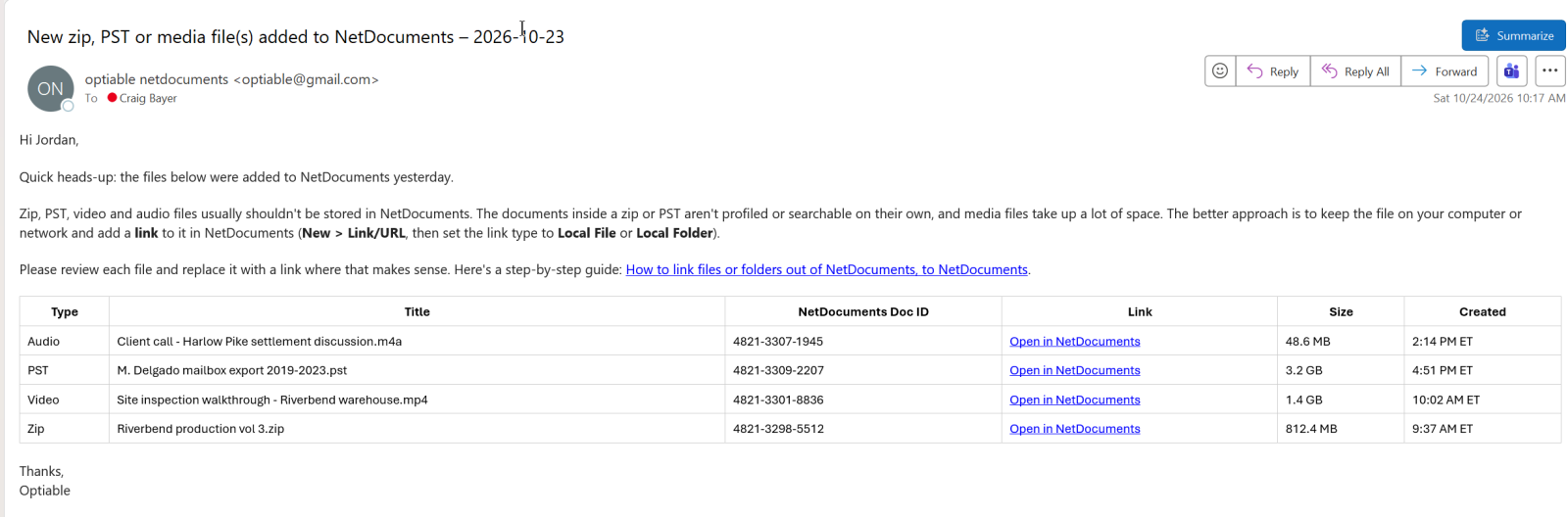
Each file gets one row in a table:
- Type – Zip, PST, Video, or Audio
- Title – The Document Name in NetDocuments
- NetDocuments Doc ID – The document’s ID, so it’s easy to find
- Link – “Open in NetDocuments,” which goes straight to the document
- Size – In MB or GB
- Created – When it was added, in Eastern time
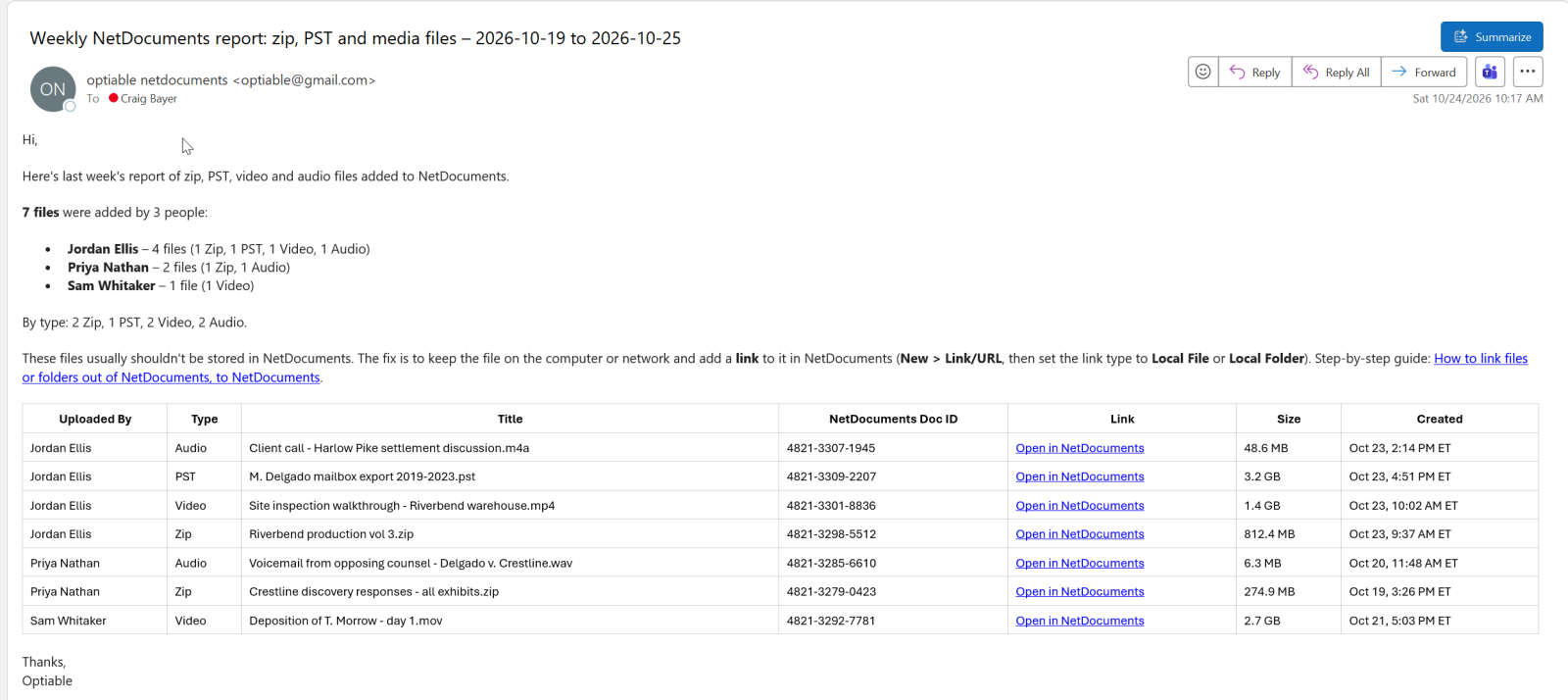
The weekly report to the admins looks the same, with one more column: Uploaded By. It’s sorted by person, so the admins can see at a glance who keeps saving these files.
How We Built It with NetDocuments and Claude
There’s no code here. I built the whole thing by describing what I wanted to Claude in plain English, then refining it over a few rounds of conversation.
Claude connects to NetDocuments through the NetDocuments connector, which lets it search the Repository by file type and the date a file was added. It connects to our email to send the messages. Then we turned the instructions into a scheduled task, so it runs automatically every day and every Monday.
It didn’t start out this big:
- Version 1 looked only for zip files and emailed whoever added them.
- Version 2 added PST files, video, and audio.
- Version 3 added .rar and .ost files and put the “link it instead” explanation in the email.
- Version 4 added the weekly report to the repository admins, with an Uploaded By column.
Each change was one sentence from me. Claude updated the scheduled task, and it kept running on the same schedule.
What We Learned Along the Way
- Claude never touches the documents – The job is read only. It finds the files and tells people about them. A person decides what to do with each one. That’s the same rule we followed with the email renaming: AI never changes documents directly.
- We cut the file size check – I also wanted to flag anything over 2 GB. But NetDocuments search can filter by file type and date, not size, so Claude would have to open the details of every document added that day just to check. That burns through a lot of AI usage to find a handful of files, so we dropped it. Searching by file type is fast and cheap.
- Start with one file type – Zip files alone proved the idea. Once we saw it working, adding PST, video, and audio took a sentence each.
- Every firm’s list is different – Some firms have good reasons to keep certain recordings in NetDocuments. The list of file types is easy to change, and it should match how your firm actually works.
Why This Matters for Your Firm
Without something watching, these files usually turn up months later, during a storage review or a cleanup project. By then nobody remembers why the file is there, and fixing it means tracking down someone who may have left the firm.
Here’s what changes when Claude watches for them:
- It catches the file the next morning – The person who saved it still remembers what it is and where the original lives. A two-minute fix today beats an afternoon of digging next year.
- It teaches instead of polices – Every email explains why the file is a problem and how to link it instead. People learn the habit from their own files, not from a training session they half-remember.
- Admins see the pattern – The weekly report shows who keeps doing it. That’s a coaching conversation, not a cleanup project.
- Nobody has to remember – It runs every day and every Monday whether anyone thinks about it or not.
The AI isn’t the hard part. Knowing what belongs in your NetDocuments, and how your firm’s Cabinets and Workspaces are set up, is.
The Bottom Line
Zip files, PSTs, and recordings end up in NetDocuments because saving them is easy and nobody tells anyone it’s a problem. Now Claude tells them, the next morning, with the fix in the same email.
It took a few sentences of plain English to build. It costs no one any time to run.
Next week I’ll cover another way we’re putting Claude and NetDocuments to work.
Want Something Like This for Your Firm?
If files like these are piling up in your NetDocuments, or you have a recurring task you wish someone else would handle, bring it to a call. We’ll tell you whether Claude can take it off your plate.
Schedule a free consultation at go.oncehub.com/optconsult, or reach out through our contact page.
Optiable has rolled out NetDocuments for over 600 law firms since 2010, mostly firms with 10 to 150 users.