

You open a document, a pop-up tells you it’s checked out. You close it, another pop-up tells you it’s checked in. Multiply that by every document you touch in a day and NetDocuments notifications get old fast.
You can turn them off in about 30 seconds.
These NetDocuments Notifications Come From ndOffice
The pop-ups aren’t coming from NetDocuments in your browser. They come from ndOffice, the piece of NetDocuments that runs on your computer. That’s where you turn them off.
The Fix: Turn Off Notifications in ndOffice (30 Seconds)
Step 1: Click on ndOffice
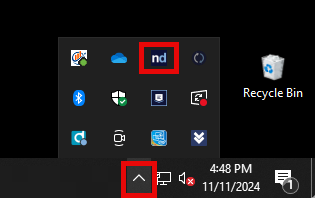
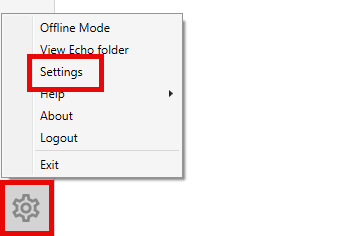
Step 2: Click the Gear

Step 3: Click Settings
Step 4: Click Notifications and Uncheck Everything
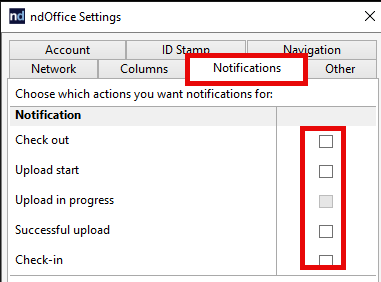
The Result
No more pop-ups when you check a document in or out.
If you decide later you want some of them back, go to ndOffice → Gear → Settings → Notifications and check the ones you want.
Need Help?
If ndOffice is getting in your way more than it’s helping, we can look at how it’s set up across your firm and clean it up — usually in a single call.
Schedule a free consultation at go.oncehub.com/optconsult or reach out at optiable.com/contact.