

If some of your documents were left on the server when you moved to NetDocuments, you can upload them yourself with the folder import tool in ndOffice — a whole folder at a time.
Why Were Some Documents Left Behind?
In NetDocuments, every client document needs a Client and a Matter. When a server folder didn’t align with a client or matter at the time of the migration, you could leave it out and bring it in later, once the Client and Matter were created.
That time is now. Here’s how to do it without dragging documents in one at a time.
What You Should Know First
- The Client and Matter have to exist first – open them in your practice management system so they flow into NetDocuments before you upload. The documents need somewhere to go.
- 30,000 documents at a time – the folder import tool can upload up to 30,000 documents in one pass. If a folder is bigger than that, import it in pieces.
How to Upload a Folder with the Folder Import Tool
Step 1: Confirm the Matter Is in NetDocuments
Search for the client and matter in NetDocuments, and confirm the Workspace is there.
Step 2: Open the Folder Import Tool in ndOffice

Step 3: Select the Folder on the Server
Browse to the folder you want to upload.
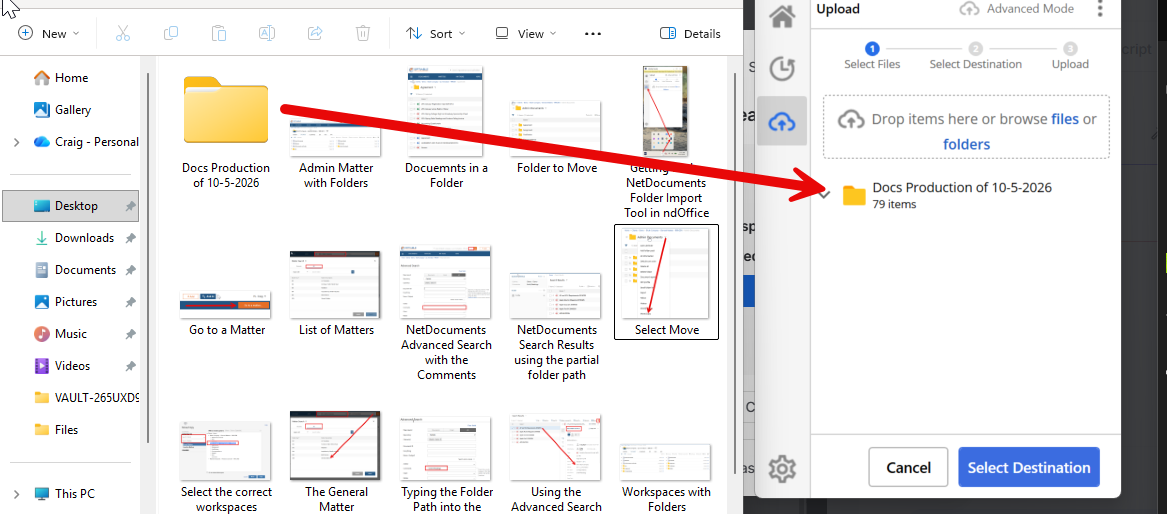
Step 4: Choose the Matter’s Workspace as the Destination
Pick the Client and Matter the documents belong to.

Step 5: Start the Import
Step 6: Check the Workspace
Open the matter’s Workspace and confirm the folder and its documents are there.
I covered the folder import tool in more detail in The Folder Import Tool Is Now Embedded into ndOffice 4.0.
Don’t Leave It on the Server
Documents sitting on the server aren’t in your DMS. Nobody can find them in NetDocuments, and they’re not protected the way the rest of your client documents are. The upload only gets done if someone does it, so put a name and a date on it.
Need Help?
If you’ve got folders that didn’t make the migration and want help getting them into the right Clients and Matters, we can walk through what’s left on your server and plan the upload with you — usually in a single call.
Schedule a free consultation at go.oncehub.com/optconsult.
Craig Bayer is the founder of Optiable and has rolled out NetDocuments for over 600 law firms since 2010, specializing in firms with 10 to 150 users.
CONNECT WITH CRAIG → https://www.linkedin.com/in/craigbayer/