

When you add someone to a NetDocuments CollabSpace, NetDocuments emails them a welcome message. Your client has never heard of NetDocuments and doesn’t know you’re the one who sent it. Here’s a short NetDocuments CollabSpace email you can send right after, so they know what that message is and what to do with it.
Copy it, paste in your CollabSpace link, and send it. If you’re an Optiable client sharing with your own clients, it works the same way.
Get Your CollabSpace Link First
Step 1: Open the CollabSpace in NetDocuments

Step 2: Copy the Link from Your Browser’s Address Bar
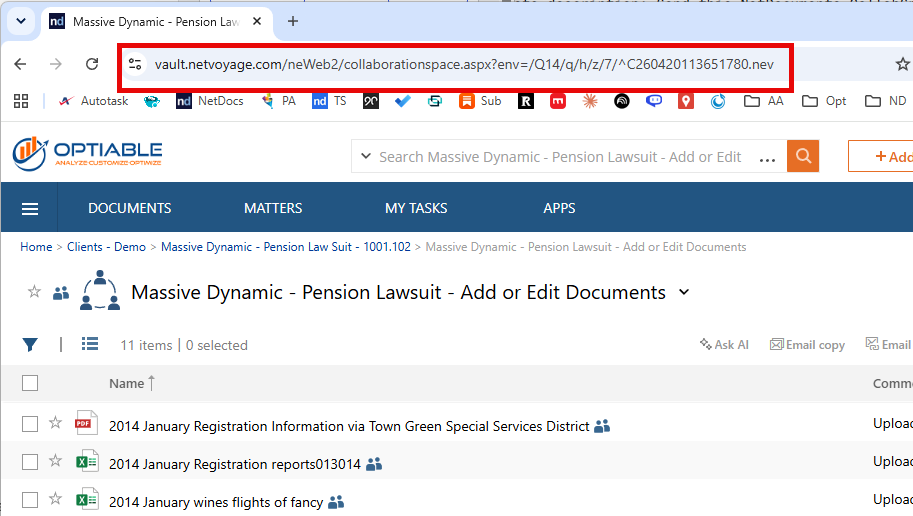
Step 3: Paste It into the Email Below Where It Says [PASTE COLLABSPACE LINK HERE]
The NetDocuments CollabSpace Email
Subject: Your document sharing login
Hi [Name],
You should have just gotten an email from NetDocuments about logging into our CollabSpace. That’s us — it’s the secure space we use to share documents with you. Click Activate in that email and create your password.
If you didn’t get it, check your junk email folder.
Once you’ve activated your account, here’s the link to your CollabSpace. Bookmark it:
[PASTE COLLABSPACE LINK HERE]
To download your documents — click the arrow next to the CollabSpace name and click Download Everything. Everything comes down as one ZIP file.
To send us documents — click Add → Upload, drag your files into the box, and click OK.
If you forget your password, here’s how to reset it: https://www.optiable.com/how-to-reset-my-netdocuments-password/
Thanks, [Your Name]
If your client wants more detail, send them How to Use a NetDocuments CollabSpace as an External User. It has the videos.
Need Help?
If you want CollabSpaces set up so your clients can upload without being able to delete anything, we can walk through your security settings with you — usually in a single call.
Schedule a free consultation at go.oncehub.com/optconsult.
Craig Bayer is the founder of Optiable and has rolled out NetDocuments for over 600 law firms since 2010, specializing in firms with 10 to 150 users.
CONNECT WITH CRAIG → https://www.linkedin.com/in/craigbayer/