

If you’ve ever clicked a document in NetDocuments and watched the preview pane spin forever without showing anything, you’re not alone. NetDocuments SmartView not loading is one of the more common calls we get, and the fix takes about thirty seconds once you know where to look.
You have this issue if:
- The SmartView preview pane spins indefinitely and never loads the document
- Every document you click shows a blank preview pane with a loading animation
- It happens on all documents, not just one specific file
That last point matters. If a single document won’t preview, that’s a problem with the document. If every document does it, it’s your browser.
Why Is NetDocuments SmartView Not Loading?
Your browser is blocking a third-party cookie from preview-us.netdocuments.com.
SmartView renders the preview from a separate NetDocuments domain than the one you’re logged into. Chrome and Edge have both tightened their default handling of third-party cookies, and when that cookie gets blocked, the preview pane has nothing to display. So it sits there and spins.
This isn’t a NetDocuments problem, and nothing is wrong with your documents. It’s a browser setting, and you can change it yourself.
The Fix: Chrome and Edge
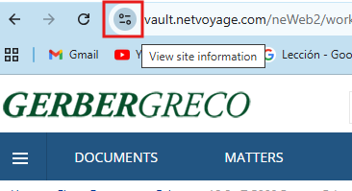
Step 1: Click the Site Information Icon
While you’re on NetDocuments, click the View site information icon to the left of the address bar in Chrome, or the lock icon in Edge.
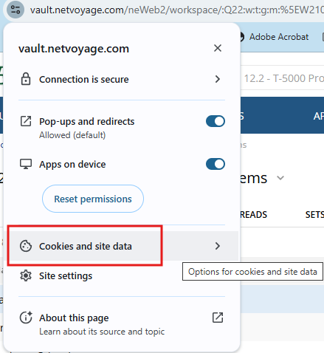
Step 2: Click Cookies and Site Data
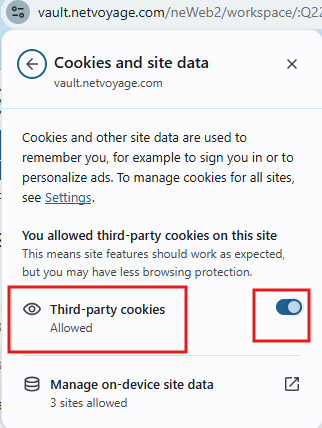
Step 3: Set Third-Party Cookies to Allowed
Find the Third-party cookies option. If it says Blocked, select it so it shows as Allowed.
Step 4: Reload the Page
When the browser prompts you to reload, click Reload.

The Result
SmartView loads documents normally again. You’re only allowing cookies for NetDocuments, not for every site you visit, so this doesn’t open anything up on other sites.
Still Blocked After Reloading?
If the third-party cookie setting is greyed out or reverts after you change it, your firm is enforcing cookie policy through group policy or a browser management profile. That’s an IT change, not a user change — ask your IT team to allow third-party cookies for netdocuments.com. It’s worth having them set it firm-wide anyway, so nobody else hits the same spinning pane.
Need Help?
If SmartView still won’t load after enabling cookies, or you’re seeing preview issues across multiple users and want someone to check your browser configurations, we can sort it out quickly. Schedule a free consultation at go.oncehub.com/optconsult.
I’ve implemented NetDocuments at over 550 law firms since 2010, primarily firms in the 10–150 user range.