

Your firm just received a set of documents exported from NetDocuments. You open the folder expecting client names, and instead you get C:\E\1923\2303\Correspondence and a file called Letter to Judge MSJ hearing 4880-0840-7320_1.docx.
Nothing is broken. Every odd thing in that folder is deliberate, and there’s a reason for each one. Here’s what you’re looking at.
Why Do the File Names Have Numbers at the End?
Every exported file carries its NetDocuments Document ID and version number. In Letter to Judge MSJ hearing 4880-0840-7320_1.docx, the 4880-0840-7320 Is the Document ID a permanent, unique address for a document within NetDocuments? The _1 Is the version.
Law firms reuse file names constantly. Twenty different matters have a “Retainer Agreement.docx.” Inside NetDocuments, that’s fine, because the Document ID keeps them apart. In Windows, they’d land in the same folder and overwrite each other. The ID on the end guarantees that can’t happen.
Why Are There More Files Than NetDocuments Said?
Because NetDocuments and Windows count differently.
NetDocuments counts a document only once, regardless of how many versions it has. Windows counts every version as its own file. A document with seven versions is one document in NetDocuments and seven files on your disk.
So an export of 50,000 documents can easily arrive as 90,000 files. Nothing was duplicated. You’re seeing the version history NetDocuments was keeping behind the scenes.

Why Are the Folders Numbered Instead of Named?
Your folders use Client ID and Matter ID rather than full names — C:\E\1923\2303\Correspondence instead of C:\Export\Smith Manufacturing Company LLC\Acquisition of Northeast Regional Holdings\Correspondence.
This isn’t us being lazy. Windows caps a full file path at 260 characters. Law firm client names are long, matter names are longer, and document names are longer still. When we test exports using full descriptive names, between a quarter and a third of the documents fail to write because the path exceeds the limit. Numbers keep every document under the ceiling.
Where Did All the Profile Information Go?
A Windows folder holds a name and a path. That’s the whole vocabulary.
Everything NetDocuments knew about each document — Client, Matter, Doc Type, author, created and modified dates, version descriptions — is in the report spreadsheet delivered with your export. One row per file, with the Document ID as the key back to the file on disk.
If your firm exported everything, you also received a Profile Attributes folder containing the lookup tables. Those are what translate the ID numbers in the folder names back into real client and matter names.
Keep that spreadsheet somewhere safe. It’s the only copy of your metadata outside NetDocuments.
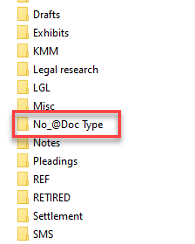
What Is the “No Doc Type” Folder?
Documents that were saved without a Doc Type assigned. NetDocuments allows it, so plenty of firms have them, and the export needs somewhere to put them. They land in a “No Doc Type” folder inside the correct Client and Matter folder.
Nothing is missing. Those documents simply never had a category.
Why Do I See Clients and Matters I Don’t Recognize?
Three causes, all normal:
- Deleted profile values – When a firm deletes a client or matter from its profile list, documents already coded to that ID keep the code. The export honors it, so you get a folder for a client that no longer exists in the system.
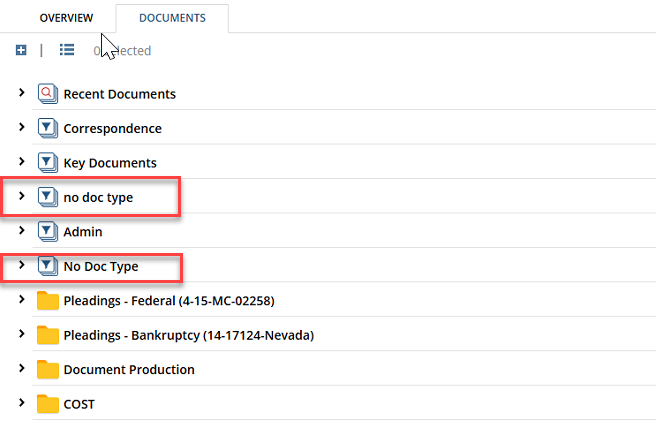
- Duplicate folders with different capitalization—same cause. Deleting and re-adding a value can leave you with “No Doc Type” and “no doc type” side by side, documents split between them.
- Matters you didn’t ask for – A document filed into a workspace keeps its own Client and Matter coding. If someone filed a Matter B document into Matter A’s workspace, it exports under Matter B.
Why Does the Same Document Appear in More Than One Folder?
NetDocuments lets a single document live in several folders at once — one document, many pointers to it. Windows has no equivalent, so an export must choose between two behaviors: write the document once, or write a copy into every folder it was filed in.
We agree on which before the export runs. If you’re seeing copies, that was the choice — it preserves the filing structure your firm actually used, at the cost of some disk space.

What About Emails?
Emails filed in NetDocuments export as .msg files. Double-click one, and it opens in Outlook, with its attachments still inside the message. They’re named the same way as everything else: subject line, Document ID, version number.
How Do I Open What I Received?
If we exported directly to your network, there would be nothing to extract. The documents are already in the location where you can open them.
If we deliver through TitanFile, your export arrives as a compressed archive split into 50 GB parts. Two things matter here:
Download every part into the same folder before you try to open anything. 7-Zip needs all the parts present and will not extract from part one on its own.
Then right-click the first part and choose 7-Zip → Extract Here. It pulls the rest in automatically.
For the full walkthrough with screenshots, see Using 7-Zip to Unzip Files.
The Bottom Line
An export is a faithful copy of what was in NetDocuments, written into a file system with fewer capabilities than the one it came from. Long names become ID numbers, versions become separate files, and the metadata moves into a spreadsheet. Once you know that, everything strange about the folder makes sense.
Keep the spreadsheet. It’s the map.
Need Help?
Just received an export and trying to work out how to get these documents into something your firm can actually search? We can look at what you received and tell you what your options are — usually in a single call.
Schedule a free consultation at go.oncehub.com/optconsult.
Optiable has guided over 550 law firms across the United States and Canada through NetDocuments implementations since 2010, specializing in firms with 10 to 150 users.